
Mailchimp vs CRM: Should You Use One System or Two?
Do your marketing and sales tools give you the complete picture of each prospect, or leave you piecing everything together?

Quick answer
Mailchimp vs CRM isn't simply a choice between two products. It's a decision about how your marketing and sales information work together. Mailchimp alone suits some marketing-led businesses; Mailchimp with a separate CRM can suit specialist needs; an integrated CRM may be simpler when you need connected engagement, follow-ups and deals.
- One system can be enough for straightforward marketing.
- Two systems may work well when the integration is genuinely useful.
- Joined-up data helps you decide who needs a follow-up and why.
01 · The decision
Mailchimp vs CRM: Do you actually need both?
If you already use Mailchimp for email marketing and something else to manage sales, ask yourself: are those systems helping each other, or creating more work?
Many small businesses start with newsletters and campaigns. As enquiries increase, they add a CRM, spreadsheet or task list to manage conversations, quotations and follow-ups. That can be sensible, but it can also divide the story of each prospect between different places.
For a small business, the Mailchimp vs CRM decision has three realistic choices: use Mailchimp alone, keep it alongside a sales CRM, or choose an integrated system where marketing and sales activity work together. The right answer depends on what your business actually needs.
02 · First approach
Option 1: Using Mailchimp on its own
Mailchimp may be enough when your main job is emailing an audience. You can manage subscribers, segment contacts, send campaigns and review engagement. It is especially relevant to businesses where customers buy directly online, without meetings or quotations.
Think of an online shop promoting new products to existing buyers. If the marketing campaign leads straight to a purchase, a full sales pipeline may add little value.
But a consultancy, agency or business-to-business service provider works differently. Someone may request a quote, talk to you twice and make a decision next month. Campaign reporting alone doesn't organise that process.
Choose Mailchimp alone if marketing is the main job and your individual sales process is minimal.
03 · Second approach
Option 2: Mailchimp with a separate sales CRM
This approach lets Mailchimp handle campaigns while another product manages pipelines, notes and reminders. It can be a good fit if you have established automation, specialist ecommerce requirements or a sales CRM your team already loves.
The catch in a Mailchimp vs CRM setup is the connection. Imagine 100 prospects in your CRM, and the same people receiving Mailchimp campaigns. When someone clicks an email, can you see that engagement beside the relevant deal and previous conversation? Or do you need to switch tabs, search for the contact and compare two histories?
Mailchimp supports third-party integrations. But the practical value depends on which records synchronise, whether updates happen reliably and where your team can see that information. Not every integration creates a useful sales view.
Before committing to two systems, check the actual workflow rather than assuming the word 'integrated' means everything is joined up. Mailchimp explains contact details and activity in its official contact profile documentation.
04 · Third approach
Option 3: One CRM with email marketing built in
When weighing Mailchimp vs CRM tools, the third option is to run campaigns and sales activity from the same system. You segment contacts and send marketing emails, but you also manage conversations, quotations, opportunities and next actions against those contacts.
That's useful because an email click becomes more meaningful when you understand the relationship behind it. Did the prospect ask for a quote last week? Is there a deal open? Did they promise to make a decision this month?
An integrated CRM doesn't guarantee better sales. It can, however, remove some of the detective work between spotting interest and deciding how to respond.
The key question: When a prospect shows interest, can you understand their history and take the next action without hunting through different systems?
05 · The hidden cost
What happens when marketing and sales systems don't talk?
Duplicate data
The same contact can exist in several places, creating extra updates and inconsistent details.
Missed context
A marketing click may matter more when it's connected to a quotation or recent conversation.
Slower follow-ups
Finding relevant history before a call takes time that could be spent speaking to prospects.
Separate systems aren't inherently wrong. The problem starts when people have to piece information together manually, particularly when they're already busy running the business.
06 · Put it together
How popcorn connects email marketing, website tracking and deals
popcorn's paid CRM and marketing offering brings email campaigns, identifiable website activity, contact notes, conversations, visual sales pipelines, quotations, deals and reminders into a connected workflow.
Imagine a prospect who has already asked for a quotation. They receive a marketing email, click through to a service page and return to your website a few days later. Where those visits can be associated with the contact, you can review the engagement alongside the existing relationship, rather than interpreting a campaign report in isolation.
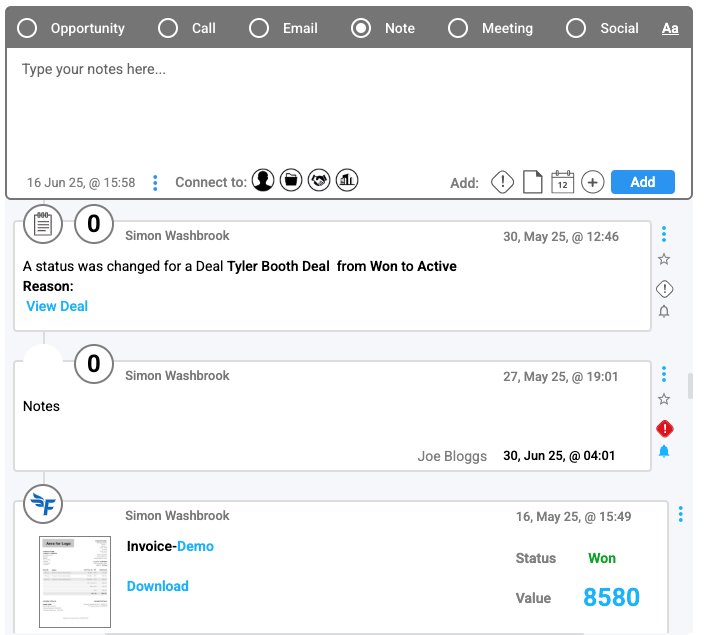
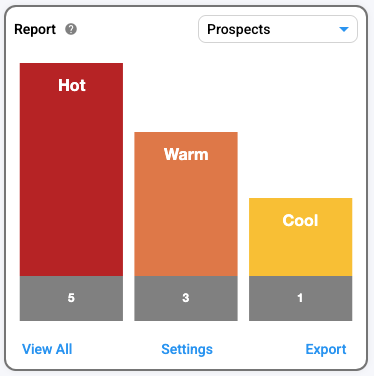
Their activity timeline helps you understand what has happened. The pipeline shows where the opportunity sits. Tasks and reminders help you decide what to do next. And Hot Prospects uses engagement signals to highlight contacts worth reviewing.
None of those signals proves someone is ready to buy. Together, they can give you a better reason to follow up, and a clearer picture of what to discuss.
It's not just about getting more data. It's about using the information you already generate to keep prospects moving towards a sale.
07 · Compare your options
Mailchimp vs CRM: Which setup is right for you?
| Your requirement | Mailchimp alone | Mailchimp + CRM | Integrated CRM |
|---|---|---|---|
| Email marketing | Yes | Yes | Where included |
| Sales pipeline | Not a core sales workflow | Through the CRM | Where included |
| Personal follow-up tasks | Not the core focus | Through the CRM | Through the CRM |
| Marketing and sales information together | Marketing-led | Depends on integration | Designed to work together |
| Website activity linked to sales | Depends on setup | Depends on integration | Depends on platform |
| Best fit | Marketing-led businesses | Specialist tool requirements | Joined-up sales and marketing |
If you mainly send newsletters and sell directly online, Mailchimp alone could be enough. If you already have specialist tools, two systems may suit you. But if you spend your day managing enquiries, quotes and follow-ups, a connected CRM deserves a closer look.
08 · Next steps
Can you replace Mailchimp with popcorn?
For many small businesses, yes. popcorn's paid offering includes email marketing as well as sales management, so you don't need to retain Mailchimp just to send campaigns.
Before moving, review your subscribers, permission records, templates, segments, automations and any specialist ecommerce features. Contact information can be prepared for import, but historical engagement and workflows may need separate attention. Our UK-based team can help you plan a practical setup.
popcorn does not currently offer a direct Mailchimp integration. The proposition is a connected alternative, not Mailchimp plus popcorn's free CRM.
09 · Common questions
Frequently asked questions about Mailchimp vs CRM
Should I use Mailchimp and a CRM together?
Yes, if you need specialist email marketing alongside a sales CRM. Check which contacts and engagement events synchronise, and whether your team can see them while managing deals and follow-ups.
Is an integrated CRM better than two separate systems?
Not automatically. An integrated CRM can reduce administration and help teams see marketing activity alongside sales. Separate specialist platforms may be better when you need advanced functionality or already have a reliable integration.
Can Mailchimp integrate with a sales CRM?
Mailchimp supports integrations with third-party systems. The available data and functionality vary by provider, subscription and configuration, so test the workflow before relying on it.
Does Mailchimp already show website engagement?
Mailchimp supports website engagement information in contact profiles for supported setups. The key question is whether that information appears alongside the sales deals, conversations and next actions your team works with.
Can popcorn replace Mailchimp?
For businesses whose marketing needs fit popcorn's built-in email tools, yes. Its paid offering combines marketing with contact timelines, website tracking, sales pipelines, deals and reminders. Compare any specialist requirements before switching.
10 · The takeaway
Mailchimp vs CRM: Choose the setup that helps you sell
Mailchimp alone, Mailchimp plus a separate CRM, and an integrated CRM are all valid choices. What matters is whether your setup helps you identify interest, understand the relationship and follow up effectively.
When your email marketing, website tracking, notes, conversations, deals and pipelines are connected, it's easier to see what matters and what needs to happen next.
You don't just need email marketing and a CRM. You need them working together.
See popcorn in action
Stop switching between systems. Start connecting your sales.
See how popcorn joins up your email marketing, website visits, customer notes, pipelines and deals so you know who to follow up with next.
UK-based team · Straightforward advice · No pressure