How do I move away from HubSpot without losing leads or follow-ups? 8 steps
Moving away from HubSpot does not have to mean losing track of leads, deals or follow-ups.
Quick answer
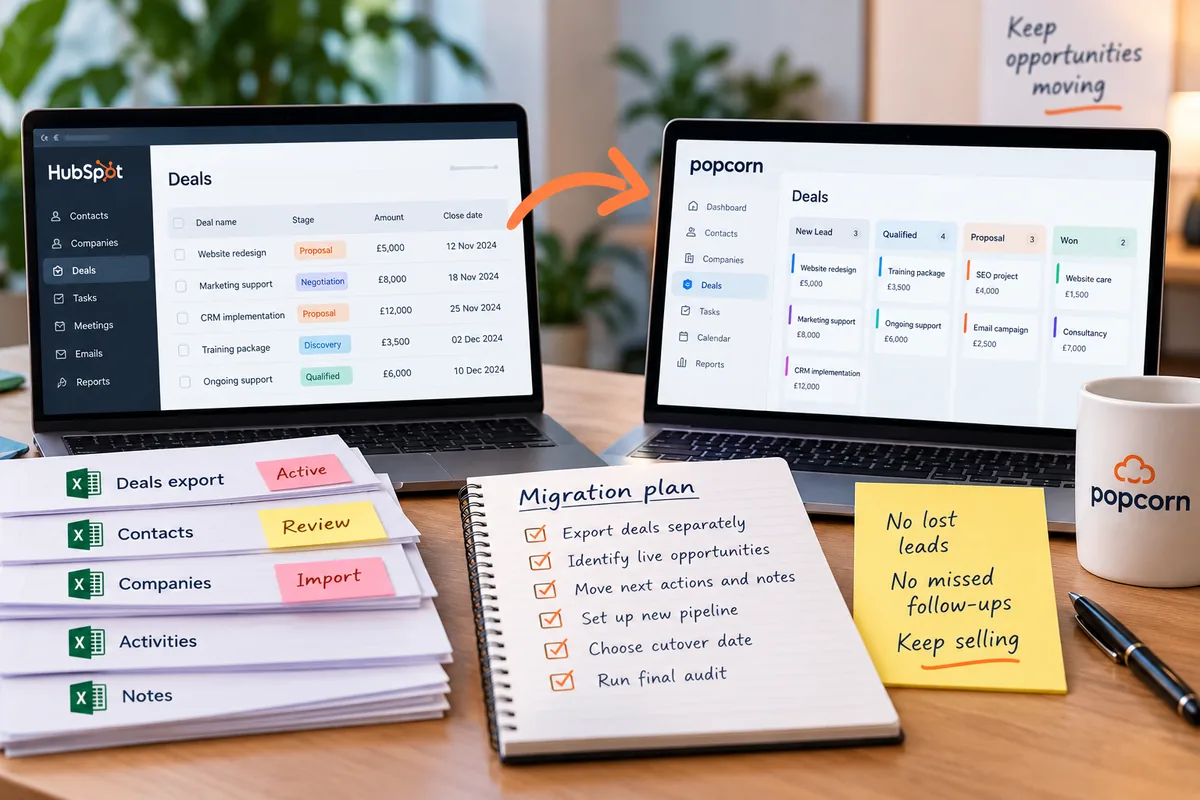
To move away from HubSpot without losing leads or follow-ups, export your deals separately, identify every live opportunity and next action, choose a clear cutover date and move active prospects before historic data. Build the new pipeline first, test the follow-up process and audit every open deal after the switch.
- Export HubSpot deals separately as a commercial safety net.
- Prioritise live leads and next actions before historic data.
- Set one clear cutover date for the team.
- Move the next action, not just the contact record.
- Bring across enough context to continue the conversation.
- Build the new pipeline before importing live deals.
- Keep one CRM as the source of truth.
- Audit every active opportunity after the move.
Overview
How do I move away from HubSpot without losing leads?
The biggest risk is not usually the migration itself.
It is that a live prospect gets forgotten while your team is moving between systems.
So the safest approach is to prioritise the work that is happening right now.
That means your active leads, open deals, next actions and important conversations should move first.
Here are eight practical steps.
01 · Deals
1. Export all your live deals separately
Before you start moving your wider database, export your deals separately.
This gives you a clear list of the opportunities your business is actively working on.
Your deal export should help you identify things like:
- deal name
- contact
- company
- current pipeline stage
- deal owner
- value
- expected close date
- next action
- relevant notes
Treat this file differently from your general contact export. It is your commercial safety net during the move.
Action: Export your deals and create a separate working spreadsheet. Then mark each one:
Focus first on the active deals.
02 · Live leads
2. Identify every live lead and upcoming follow-up
Do not begin with the oldest data. Start with the people your team is talking to now.
That includes:
- recent enquiries
- open opportunities
- overdue follow-ups
- meetings already booked
- proposals awaiting a decision
- people expecting a call
- deals with a clear next action
These records carry the highest commercial risk if they get missed.
Action: Create a priority list of every lead and opportunity that needs attention in the next 30 days.
Make sure each one has:
- an owner
- a pipeline stage
- a useful note
- a next action
- a date for that action
If any of those are missing, fix them before you move.
03 · Cutover
3. Choose a clear cutover date
One of the easiest ways to create confusion is allowing the team to use both CRMs indefinitely.
You need a clear point when the new CRM becomes the system your team works from.
You may still keep HubSpot available temporarily for checking historic information, but everybody should know where new notes, deals and follow-ups belong.
Action: Choose a date and tell the team:
From this date, all new sales activity goes into the new CRM.
After that point, HubSpot should be treated mainly as a reference unless there is a specific reason to update it.
04 · Priorities
4. Move active prospects before historic data
You do not need to migrate your entire database before your team can start using the new CRM.
Move the commercially important records first.
A prospect who is deciding whether to buy this week is more important than an old contact from three years ago.
That means your migration order should usually be:
-
Live leads
-
Open deals
-
Upcoming follow-ups
-
Current customers
-
Useful historic contacts
-
Everything else you decide to keep
Action: Create a first-wave import containing the contacts your team is actively working on.
Get those records into the new CRM first. The historic database can follow afterwards.
05 · Next actions
5. Move the next action, not just the contact details
A contact record without a next action is where leads start disappearing.
Do not only migrate the name, email address and company.
For every live prospect, make sure the new CRM also shows what should happen next.
That might be:
- call on Tuesday
- send a proposal
- follow up after a meeting
- check back next month
- confirm pricing
- arrange a demo
- wait for a decision
Action: Review every active deal and ask: "What are we supposed to do next?"
If that answer is not obvious in the new CRM, the migration is not finished.
06 · Context
6. Bring across the context your salesperson actually needs
You do not necessarily need every historic email, activity and note from HubSpot.
You do need enough context for the salesperson to continue the conversation without starting again.
For each active opportunity, bring across the information that matters. That could include:
- what the prospect needs
- previous conversations
- objections
- budget
- agreed next steps
- important dates
- decision-makers
- relevant notes
The aim is continuity.
A salesperson should be able to open the new CRM and understand what has happened and what needs to happen next.
Action: For your most valuable or active opportunities, check the records manually.
If the useful context is missing, add a short summary rather than moving years of irrelevant activity.
07 · Pipeline
7. Set up your new pipeline and reminders before the team switches
Do not wait until the data has been imported before deciding how the new CRM should work.
Build the new sales pipeline first.
As we covered in the migration guide, you do not need to recreate the HubSpot pipeline exactly.
Use the opportunity to build something that better reflects your actual sales process.
If you have exported the existing HubSpot pipeline stage, keep it as a tag or reference field. That gives you a useful guide for deciding where each deal belongs in the new pipeline.
Then set up your follow-up process.
Action: Before the cutover date:
- build your pipeline
- agree what each stage means
- create the important reminders
- import the old HubSpot stage as a reference where useful
- place your active opportunities into the correct new stage
Once the team starts working in the new CRM, they should immediately know where to look and what to do.
08 · Audit
8. Audit every live opportunity after the move
Do not assume the migration is complete just because the import finished successfully.
A few days after switching, review the live deals again. This is your final safety check.
For every active opportunity, ask:
- Is the right contact there?
- Is the deal in the correct stage?
- Is the right salesperson responsible?
- Is the important context visible?
- Is there a next action?
- Is there a date for that action?
If the answer to any of those is no, fix it.
Action: Run this audit once immediately after the migration and again about a week later.
That second check can catch anything that slipped through while the team was getting used to the new CRM.
The priority
The safest migration starts with your next follow-up, not your database
It is easy to become obsessed with moving every record.
But the biggest commercial risk is often much simpler:
That is why the priority should be:
Live leads → open deals → next actions → useful context → historic data
If those first four are protected, the business can keep selling while the rest of the migration is completed.
popcorn CRM is built around helping small businesses see what needs their attention next.
The Daily Dashboard brings leads, deals and follow-ups into one view, helping the team immediately see who needs contacting and which opportunities are moving.
Paid popcorn customers also receive a free onboarding session.
If you are moving from HubSpot, that session can help you get the pipeline set up, bring across the useful information and make sure your live opportunities are ready to work from day one.
Summary
Quick checklist: moving away from HubSpot without losing leads
Before switching, check:
- Have you exported your deals separately?
- Have you identified all active opportunities?
- Have you listed every follow-up due soon?
- Does every live prospect have a next action?
- Have you chosen a clear cutover date?
- Are active prospects being moved before historic data?
- Does each salesperson have enough context to continue the conversation?
- Is the new pipeline already built?
- Are reminders and follow-ups working?
- Have you audited every live deal after the move?
Frequently asked questions
How do I move away from HubSpot without losing leads?
Start with your live sales activity rather than your full database. Export your deals separately, identify active leads and upcoming follow-ups, and make sure every opportunity has an owner, pipeline stage, useful context and next action. Move those records into the new CRM first, then migrate less important historic data afterwards.
Should I export HubSpot deals separately from my contacts?
Yes. Exporting deals separately gives you a clear working list of the opportunities your business is actively managing. Review that file carefully and prioritise open deals, expected close dates, owners, stages and next actions. Treat it as your commercial safety net while the wider contact database is being migrated.
Should I move all my HubSpot contacts at the same time?
Not necessarily. Move the contacts connected to live leads, open deals and upcoming follow-ups first. Once your team can work safely from the new CRM, you can migrate useful historic contacts afterwards. This reduces the risk of commercially important prospects becoming buried inside a large migration.
How long should I run HubSpot and the new CRM together?
A short overlap period can be useful for checking historic information and verifying migrated records. However, choose one CRM as the source of truth from a clear cutover date. If both systems remain actively updated for too long, your team can easily create conflicting records and missed follow-ups.
What should I check after moving to a new CRM?
Review every active opportunity. Check that the correct contact, owner, pipeline stage, notes and next action are present. Make sure upcoming follow-ups have dates and that the salesperson responsible can see what they need to do. Repeat the audit a few days later to catch anything missed during the initial switch.
Can popcorn help me move from HubSpot?
Yes. Paid popcorn CRM customers receive a free onboarding session. This can help you set up the sales pipeline, bring across the useful information and make sure your live leads, deals and follow-ups are ready to work from the new CRM without recreating unnecessary HubSpot complexity.
See popcorn in 90 seconds
The Small Business Alternative to HubSpot
See how popcorn keeps your customer journey joined up, without the complexity or the HubSpot price tag.
No contracts · No setup costs · UK-based support