Do I need HubSpot Marketing Hub Professional? 7 questions to ask before upgrading
If you are considering upgrading to HubSpot Marketing Hub Professional, the first question should not be "What extra features do I get?"
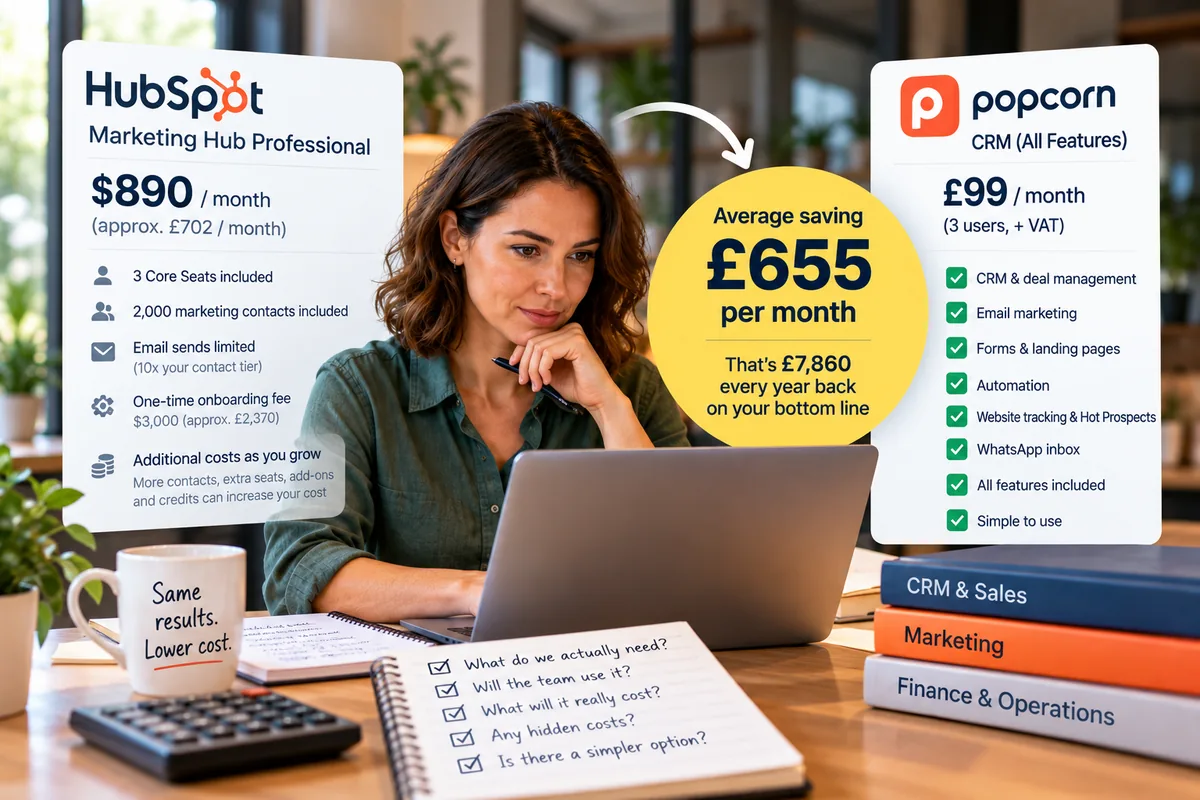
Quick answer
You may not need HubSpot Marketing Hub Professional if your main requirements are CRM, deal management, follow-ups, email marketing, forms, automation, website tracking and lead nurturing. Before upgrading, compare the real cost of the Professional plan, including onboarding, seats, marketing contacts, email limits and add-ons, against a simpler CRM that already includes the essential tools your business actually uses.
- Start with the problem you need to solve, not the feature list.
- Check which Professional features are genuinely essential.
- Review the real cost beyond the headline subscription.
- Watch marketing-contact tiers and email-send limits.
- Compare onboarding, extra seats, credits and add-ons.
- Consider a specialist tool instead of automatically upgrading.
- popcorn can provide CRM, deal management, nurturing and website tracking for small businesses at a much lower monthly cost.
- Based on small businesses using the popcorn HubSpot comparison tool, the average saving identified is £655 per month, or £7,860 per year.
Overview
Start with the problem, not the upgrade
The first question should not be: "What extra features do I get?"
It should be: "What problem am I actually trying to solve?"
That distinction matters.
A small business can easily move onto a more expensive software tier because one or two useful features sit behind the upgrade.
Then, months later, discover that it is paying for a much larger platform than it really needs.
Before upgrading, work through these seven questions.
01 · The problem
1. What problem are you actually trying to solve?
Start with the business problem, not the feature list.
For example:
| Problem | Need |
|---|---|
| We are not nurturing leads properly. | email marketing, automation and follow-up. |
| We cannot see which prospects are showing interest. | website tracking and better visibility of engagement. |
| We are losing track of opportunities. | deal management, pipeline visibility and reminders. |
| Sales and marketing activity are disconnected. | one joined-up view of the contact. |
Once you are clear on the problem, you can ask whether upgrading HubSpot is genuinely the best way to solve it.
That is very different from starting with a list of everything Marketing Hub Professional can do.
Action: Write down:
Then compare your options against that.
02 · Features
2. Which Marketing Hub Professional features do you genuinely need?
Separate the features into two groups:
A feature can look useful in a demo without being important enough to justify a much larger monthly commitment.
Ask:
- Will we use this every week?
- Who will use it?
- Does it directly help generate or convert leads?
- Would we buy this feature separately if we had to?
- What happens if we do not have it?
If the upgrade is mainly being driven by one or two features, stop and compare other options before committing.
03 · Alternatives
3. Could your existing HubSpot setup plus another tool solve the problem?
You do not have to put everything inside one platform.
Instead of asking: "How do we get more functionality inside HubSpot?"
ask: "Could we keep what we already have and use a specialist tool for the part we actually need?"
For many small businesses, this can be more cost-effective and easier to manage.
You might use:
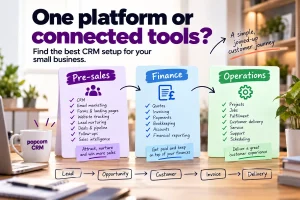
- one system for pre-sales
- one for finance
- one for operations
As long as the systems connect sensibly, you can still create a joined-up customer journey without forcing everything into one large platform.
04 · Marketing tools
4. Do you need essential marketing tools, or a full marketing platform?
This is one of the most important questions in the decision.
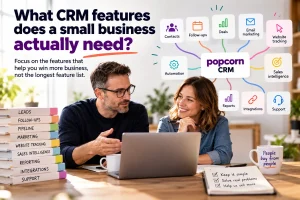
A small business may need:
- email marketing
- forms
- landing pages
- automation
- website tracking
- lead nurturing
- lead scoring or hot-prospect visibility
- WhatsApp communication
- segmentation
But that does not automatically mean you need a full enterprise-style marketing platform.
What matters is whether the tools are joined up with your CRM. For example:
Website visitor → Form completion → CRM contact → Nurture email → Website return → Hot prospect → Sales opportunity
That is the journey you are trying to support.
If a simpler CRM already gives you the essential marketing tools, deal management, follow-ups and website tracking you need, upgrading to a much larger platform may not be necessary.
05 · Cost
5. What will HubSpot Marketing Hub Professional really cost?
Do not make the decision using the headline subscription price alone.
The real cost can include:
- the Professional subscription
- required onboarding
- additional users
- additional marketing contacts
- higher contact tiers as your database grows
- extra Hubs or add-ons
- HubSpot Credits and usage-based features
- integrations or additional software
- the time required to administer the platform
The headline monthly price is only the starting point.
Watch your marketing contact numbers
HubSpot distinguishes between marketing contacts and non-marketing contacts.
Marketing contacts are the contacts you actively use for marketing activity, and your cost can increase as the marketing-contact tier increases.
So ask: "How many people do we genuinely need to market to through HubSpot?"
Not simply: "How many contacts do we have?"
Check the email-send limit too
Marketing Hub Professional does not mean unlimited marketing email.
Your email-send allowance is linked to your marketing-contact tier.
That matters if you are running nurture campaigns, newsletters, automated follow-ups and other marketing activity.
For example, if you have 2,000 marketing contacts and send four nurture emails per month, that is already 8,000 sends before newsletters, workflows and additional campaigns are counted.
So before upgrading, ask: "How many marketing contacts will we have, and how many emails will we realistically send to each of them every month?"
Look at the costs around the subscription
There are also additional costs that are easy to overlook when you focus only on the headline price.
These can include:
- onboarding
- extra seats
- growing marketing-contact tiers
- add-ons
- credits
- additional products
- internal administration time
That is why it is worth calculating the real annual cost before upgrading.
06 · Your team
6. Will your team actually use the extra functionality?
More software only creates value if somebody uses it.
Ask:
- Who will set it up?
- Who will manage it?
- Who will build the automations?
- Who will maintain the reporting?
- Who will train the team?
- Who will check everything keeps working?
If the answer to most of those questions is:
"Probably me."
then the administration cost matters too.
A more powerful platform can be the right answer if your business has the resources to use it properly.
But for a small team, there is a point where more functionality simply creates more work.
07 · The big question
7. Could a simpler CRM plus specialist tools give you the same business outcome for less?
This is the big question.
You do not necessarily need one platform to run the whole business.
Think about the business in three connected areas:
Pre-sales
This is where popcorn fits. It covers things like:
- CRM
- lead generation
- deal management
- follow-ups
- email marketing
- forms
- landing pages
- automation
- website tracking
- Hot Prospects
- WhatsApp communication
- nurturing leads
Finance
Your finance system can handle:
- quotations
- invoicing
- payments
- bookkeeping
- accounts
Operations
Your operations system can handle:
- project delivery
- jobs
- service
- fulfilment
- operational workflows
Connected together, the customer journey can still flow:
Lead → Opportunity → Customer → Invoice → Delivery
without every part of the business having to live inside one enormous platform.
That gives you something important: flexibility.
If your operations requirements change later, you can change the operations system.
If your finance requirements change, you can change the finance system.
If your pre-sales requirements change, you can change the CRM.
You are not locked into replacing everything at once.
The numbers
What could the difference mean to your bottom line?
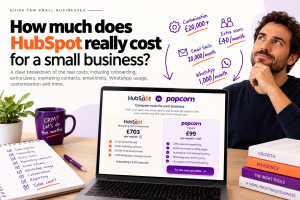
Based on small businesses that have used the HubSpot vs popcorn comparison tool, the average saving identified is:
£655 per month
That is:
£7,860 every year
back on the bottom line.
That is why it is worth comparing the cost before automatically upgrading.
The question is not simply: "Can HubSpot Marketing Hub Professional do more?"
It can.
The better question is: "Do I need those extra features badly enough to spend thousands of pounds more every year?"
If your main requirement is CRM, deal management, follow-ups, email marketing, forms, automation, website tracking and lead nurturing, compare the cost of achieving that with popcorn first.
Try the HubSpot vs popcorn comparison calculator: https://popcorncrm.co.uk/alternative-to-hubspot/
Growth
Don't assume growth means buying a bigger platform
Growing does not automatically mean:
"We need more software."
Sometimes it means:
"We need better-connected software."
Three well-chosen systems can often be:
- more cost-effective
- easier to use
- better designed for small businesses
- easier to change as requirements evolve
The goal is not to create a sprawling collection of apps.
It is to choose a small number of systems, each with a clear job.
For many small businesses, that can be a much better growth strategy than continually moving up a larger all-in-one platform.
popcorn
Where popcorn fits
popcorn CRM is designed specifically for small businesses that want the important pre-sales tools joined together.
That includes:
- CRM
- deal management
- follow-ups
- email marketing
- forms
- landing pages
- automation
- website tracking
- Hot Prospects
- WhatsApp activity
The point is not that popcorn does everything HubSpot does. It does not.
If your goal is to generate leads, nurture them, identify engagement, manage deals and keep follow-ups moving, popcorn may already give you the core tools you need without forcing you into a much larger software commitment.
Summary
Quick checklist: before upgrading HubSpot
Ask:
- What problem are we actually trying to solve?
- Which Professional features are genuine must-haves?
- Are we upgrading for only one or two features?
- Could another tool solve that problem for less?
- Do we need a full marketing platform, or just essential marketing tools?
- Are marketing, CRM and website tracking joined up?
- What will the upgrade really cost over 12 months?
- How many marketing contacts will we actually need?
- What are the email-send limits?
- What onboarding, seats, credits and add-ons will we need?
- Who will manage the extra functionality?
- Will the team actually use it?
- Could a simpler CRM plus finance and operations tools give us the same outcome?
- Are we buying more software than the business really needs?
If you cannot answer those clearly, it is worth reviewing the decision before you upgrade.
Frequently asked questions
Do I need HubSpot Marketing Hub Professional?
Not necessarily. It depends on the problems your business is trying to solve and which Professional features you genuinely need. If you mainly need CRM, deal management, follow-ups, email marketing, automation and website tracking, a simpler CRM may provide the outcome you need at a lower cost and with less administration.
Is HubSpot Marketing Hub Professional worth it for a small business?
It can be if your team actively uses the wider marketing functionality and has the resources to manage it properly. If you are upgrading mainly for one or two features, or your team only needs essential lead-generation and nurturing tools, compare the full cost against simpler alternatives before committing.
Are there additional costs beyond the HubSpot Professional subscription?
Yes. Depending on your setup, additional costs can include onboarding, extra seats, growing marketing-contact tiers, add-ons, credits, integrations and administration time. That is why it is important to calculate the total annual cost rather than relying only on the headline monthly price.
Are HubSpot marketing emails unlimited?
No. Marketing email sends are subject to limits linked to your marketing-contact tier. If your nurture strategy involves several emails per contact each month, calculate the likely send volume before upgrading so you understand whether the included allowance will be enough.
Can I use another tool instead of upgrading HubSpot?
Yes, depending on your requirements. A small business can use a specialist pre-sales CRM, finance software and operations software and connect them where appropriate. This can be more flexible and cost-effective than moving everything into one large platform.
Can popcorn replace HubSpot Marketing Hub Professional?
popcorn is not designed to replicate every HubSpot feature. It is designed for small businesses that need CRM, deal management, follow-ups, essential marketing tools, website tracking and lead nurturing in one simpler system. If those are the capabilities your business actually needs, it may be worth comparing before upgrading.
How much could a small business save by switching from HubSpot to popcorn?
Based on small businesses that have used the HubSpot vs popcorn comparison tool, the average saving identified is £655 per month, equivalent to £7,860 per year. Your own saving will depend on your HubSpot setup, users, contacts and features, so use the comparison calculator to check your figures.
Sources
See popcorn in 90 seconds
The Small Business Alternative to HubSpot
See how popcorn keeps your customer journey joined up, without the complexity or the HubSpot price tag.
No contracts · No setup costs · UK-based support