Best CRM setup for a small business: one platform or connected tools?
When a small business starts growing, there is often a temptation to look for one big software platform that does everything.
Quick answer
For many small businesses, three connected specialist systems can be better than one giant platform. A CRM can manage lead generation, nurturing, deals, pipeline forecasting and follow-ups; finance software can handle quotes, invoices and payments; and operations software can manage delivery. The key is connecting them around one customer journey.
- Do not assume growth means moving everything into one platform.
- Think in three connected areas: pre-sales, finance and operations.
- Pre-sales should include lead generation, deal management, pipeline forecasting, nurturing, website tracking and follow-ups.
- Finance should handle quotes, invoicing, payments and accounts.
- Operations should handle delivery, projects, jobs, fulfilment or service.
- Connected specialist tools can be more flexible and cost-effective.
- For UK businesses, finance software should be HMRC-recognised for Making Tax Digital.
- popcorn is a FreeAgent partner.
- Quotes created in popcorn can sync into FreeAgent as a pre-invoice, helping move the customer from sales into finance without rekeying data.
- Similar connected-workflow principles can apply with other leading business and accounting platforms through integrations.
- Keep the stack simple and avoid creating a spaghetti bowl of disconnected apps.
Overview
One platform, or the right systems working together?
The idea sounds neat. One system. One login. Everything in one place.
But that does not always make it the best setup for a small business.
In many cases, three well-chosen systems can be better than one giant platform.
The better question is: "Do we really need one system to do everything, or do we need the right systems to work together?"
That is a very different way to think about your technology.
For UK small businesses, the right setup also needs to work with HMRC's Making Tax Digital rules, UK GDPR and the way your team actually works day to day.
01 · The structure
1. Start with the three parts of the business
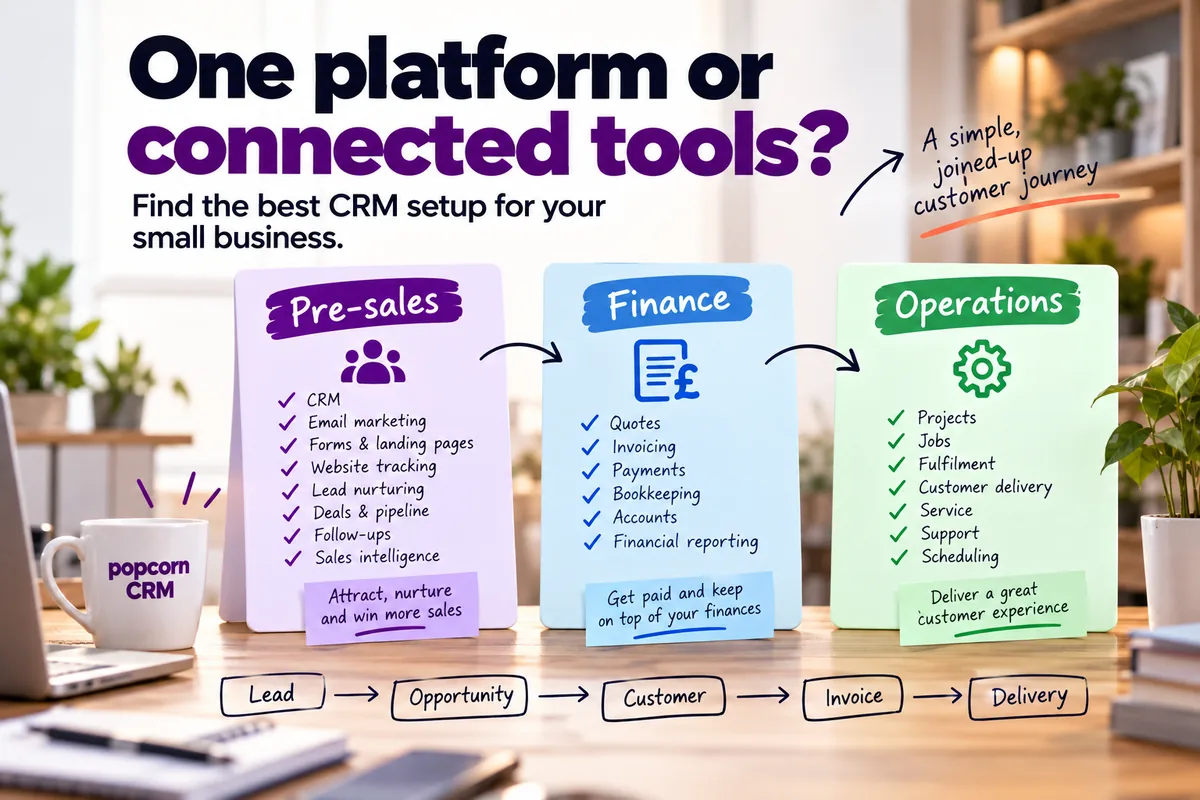
A useful way to think about your systems is to split the customer journey into three areas:
Pre-sales
This is everything that happens before the customer buys.
That includes:
- CRM
- lead generation
- email marketing
- forms
- landing pages
- website tracking
- lead nurturing
- sales intelligence
- deal management
- visual sales pipeline
- deal values
- expected close dates
- pipeline forecasting
- sales targets
- follow-ups
Finance
This is what happens around the commercial transaction.
That can include:
- quotes
- pre-invoices
- invoicing
- payments
- bookkeeping
- accounts
- financial reporting
Operations
This is what happens after the sale.
Depending on your business, that might include:
- project delivery
- jobs
- fulfilment
- service
- customer support
- operational workflows
- scheduling
You do not necessarily need one system to do all three.
You need each part to work well.
02 · Cost
2. Why one giant platform can become expensive
Large all-in-one platforms can be powerful. But the breadth comes with a trade-off.
You may end up paying for:
- features you do not use
- higher tiers to unlock one useful tool
- extra seats
- contact limits
- marketing capacity
- add-ons
- credits
- onboarding
- consultancy
- customisation
- reporting setup
The problem is not that those features are bad.
The problem is when a small business pays for a lot of software that does not contribute much to the way it actually works.
The bigger the platform gets, the easier it is to disappear down a feature rabbit hole.
03 · Specialist tools
3. Three specialist tools can be a better fit
For many small businesses, a specialist tool for each area can make more sense. For example:
Pre-sales
a CRM built around generating, nurturing and converting leads
Finance
accounting software designed specifically for quotes, invoicing, payments and bookkeeping
Operations
a project, job or delivery system built around what happens after the sale
Each tool has a clear job.
That can make the overall setup:
- easier to understand
- easier to use
- more cost-effective
- easier to change later
And because the tools are designed around specific jobs, they are often better suited to the people actually using them.
04 · Pre-sales
4. Your pre-sales system should do more than store contacts
For a small business, the CRM should sit at the centre of the pre-sales process.
That means it should help with more than storing names and email addresses.
It should help you:
- generate leads
- capture website enquiries
- nurture prospects
- send email marketing
- track website activity
- identify warmer prospects
- manage deals
- see where every opportunity sits
- forecast pipeline value
- track expected close dates
- monitor sales targets
- keep on top of follow-ups
- move opportunities through the pipeline
- understand what needs attention today
A good pre-sales system should help answer: "Who should we focus on next, what is likely to close and what value is sitting in the pipeline?"
That is where CRM becomes commercially useful.
05 · Marketing
5. Essential marketing tools should be joined to the CRM
This is important. Your marketing tools should not sit in a separate island.
If somebody:
visits your website → fills in a form → receives an email → returns to the site → becomes more engaged → enters the sales pipeline
your CRM should help you see that journey.
That is much more useful than having one system for contacts, another for email marketing and another for website activity with no connection between them.
For a small business, the essential marketing tools might include:
- email marketing
- forms
- landing pages
- automation
- website tracking
- lead nurturing
- segmentation
- WhatsApp communication
The value comes from those tools being connected to the same contact record.
For UK businesses: keeping marketing consent on the same contact record also makes it easier to show who has agreed to hear from you, which supports your UK GDPR and PECR obligations for email marketing.
06 · Website tracking
6. Website tracking can help sales focus on the right people
Website activity can be a useful buying signal.
If an existing prospect:
- comes back to your website
- visits the pricing page
- looks at a particular service
- returns after receiving an email
- starts engaging more often
that can help your salesperson decide who deserves attention.
The CRM should not just tell you what happened. It should help you work out what to do next.
In popcorn CRM, website tracking and marketing activity feed into Hot Prospects, helping surface contacts showing stronger signs of interest.
That gives the sales team a better idea of where to focus.
07 · Forecasting
7. Deal management and pipeline forecasting should sit in pre-sales
This is a key part of the setup.
A CRM should help you manage the opportunity before it becomes revenue.
That means being able to see:
- open deals
- deal stage
- deal value
- owner
- expected close date
- next action
- stalled opportunities
- pipeline value
- likely future revenue
- sales targets
Pipeline forecasting helps a small business move beyond simply asking:
"How many deals do we have?"
and start asking:
"What is likely to close, when, and what does that mean for the business?"
That gives sales activity more commercial context and can help with planning.
08 · Finance
8. Finance should do finance well
Your finance system has a different job.
It should be strong at:
- creating quotes and invoices
- recording payments
- managing accounts
- reconciling transactions
- financial reporting
- bookkeeping
You do not necessarily need your CRM to recreate all of that.
Instead, the important question is: "Can the systems share the information they actually need?"
For UK businesses: check Making Tax Digital
In the UK, your finance software also needs to keep you on the right side of HMRC.
VAT-registered businesses already need software that is compatible with Making Tax Digital (MTD) for VAT.
Making Tax Digital for Income Tax is also being phased in for sole traders and landlords. According to GOV.UK, it applies from 6 April 2026 where qualifying income is over £50,000, from April 2027 where it is over £30,000 and from April 2028 where it is over £20,000.
So when you choose the finance part of your stack, check that it is HMRC-recognised for the Making Tax Digital rules that apply to you. That is one more reason to choose specialist accounting software rather than relying on a general platform to do finance as a side job.
A practical example: popcorn and FreeAgent
popcorn is a FreeAgent partner.
If you build a quote in popcorn, it can sync into FreeAgent as a pre-invoice.
That means the customer can move from the sales process into finance without somebody having to manually re-enter the same information.
The flow becomes:
Lead → Deal → Quote in popcorn → Pre-invoice in FreeAgent → Invoice → Payment
That is exactly what connected tools should do.
Each system stays focused on the job it is best at, while the customer journey continues across them.
FreeAgent is a UK accounting platform that is HMRC-recognised for Making Tax Digital, so this example keeps both the sales and the finance side of the journey UK-ready.
The same principle can apply when popcorn connects with other leading business and accounting platforms through integrations.
The goal is not to duplicate every feature in every system.
It is to move the right information at the right time.
09 · Operations
9. Operations should fit how you actually deliver
Operations can vary enormously from business to business.
That is why operations software is often better when it is specialised.
Trying to force every type of operational process into one giant platform can create more complexity than value.
The question should be: "What system best supports the way we deliver what we sell?"
10 · Connect
10. Connect the systems around the customer journey
The goal is not to create three separate islands. The goal is to connect them around the customer.
Think of the flow:
Lead → Opportunity → Customer → Invoice → Delivery
Or in more detail:
Lead generation → CRM → Nurturing → Deal → Pipeline → Forecast → Won customer → Quote → Pre-invoice → Invoice → Payment → Delivery
The systems should pass the important information between them where needed.
That might include:
- contact details
- company details
- deal value
- customer status
- quote information
- invoice information
- project information
The connection does not need to move every piece of data.
It needs to move the right data.
That distinction matters.
For UK businesses: moving only the data each system genuinely needs also fits the data minimisation principle in UK GDPR. It is worth knowing where each system stores customer data, too. popcorn stores data on secure servers in the UK/EU.
11 · Flexibility
11. Connected tools give you more flexibility as you grow
This is one of the biggest advantages.
If everything lives inside one giant platform, changing one part can become difficult.
With a connected setup, you can replace one system without rebuilding everything else. For example:
- If your operations become more complex, you can upgrade the operations system.
- If your finance requirements change, you can change the accounting platform.
- If your sales process changes, you can change the CRM.
That makes the technology stack more modular.
You are not locked into one ecosystem for every part of the business.
12 · Cost
12. This can also save a lot of money
A connected setup can be significantly more cost-effective.
Instead of paying for a very broad platform to unlock one or two useful features, you can choose tools that solve the specific problems you have.
That can help avoid:
- expensive upgrades
- unused features
- large onboarding costs
- heavy customisation
- unnecessary user licences
- paying for functionality outside your real needs
The cheapest setup is not always the best setup. But neither is the most expensive.
The goal is to get the right business outcome for the right cost.
13 · Keep it simple
13. Don't build a spaghetti bowl of apps
There is a warning here.
Three connected systems can be excellent.
Fifteen disconnected tools can be a nightmare.
The aim is not to keep adding software. It is to keep the stack simple.
A good setup should have:
- a clear role for each system
- a clear source of truth
- sensible integrations
- as little duplication as possible
- people who understand where information belongs
If nobody knows which system owns the data, the technology is working against you.
14 · AI
14. AI does not need to be everywhere either
AI can be extremely useful. It can help with:
- summaries
- admin
- suggestions
- prioritisation
- analysis
But do not assume every system needs AI in every corner.
Use it where it genuinely helps.
AI should support the human, not remove them from the process.
The ideal setup
What does the ideal small-business setup look like?
For many businesses, a sensible structure could be:
Pre-sales
CRM + lead generation + marketing + website tracking + lead nurturing + deal management + pipeline forecasting + follow-ups
Finance
Quotes + pre-invoices + invoicing + payments + accounts
Operations
Project + job + delivery + fulfilment + service
Then connect those systems where the customer journey crosses between them.
That gives you: specialist tools with a joined-up business.
You do not have to choose between:
one giant platform
and:
a pile of disconnected apps.
There is a very practical middle ground.
popcorn
Where popcorn fits
popcorn CRM is designed around the pre-sales part of a small business.
It brings together:
- CRM
- contact management
- deal management
- visual sales pipelines
- pipeline forecasting
- sales targets
- follow-ups
- email marketing
- forms
- landing pages
- automation
- website tracking
- Hot Prospects
- dashboards
- integrations
The aim is to help a small business generate leads, nurture them, identify buying signals, manage opportunities, forecast the pipeline and keep follow-ups moving.
popcorn is also a FreeAgent partner, helping connect the sales process into finance.
A quote created in popcorn can sync into FreeAgent as a pre-invoice, helping reduce duplicate data entry and keeping the customer journey moving.
As a UK company, popcorn also provides UK-based support, with phone support included on paid plans, and stores data on secure servers in the UK/EU.
Finance and operations can then be handled by specialist tools suited to those areas.
That gives you a technology stack that can grow with the business without forcing everything into one platform.
The verdict
One platform or connected tools?
There is no universal answer.
One platform may be the better option if:
- your business genuinely needs broad functionality across several departments
- you have more complex automation and reporting requirements
- multiple teams need to work inside the same ecosystem
- you have the budget and resources to manage it
Connected specialist tools may be the better option if:
- you have a smaller team
- you want each tool to be easy to use
- you want clearer costs
- you want more flexibility
- you want systems designed around specific jobs
- you want to swap individual tools as the business changes
The important thing is not how many systems you have.
It is whether they work together to support the business.
The real question
The real question
Do not ask: "How do we get everything into one platform?"
Ask: "What is the best tool for each part of our business, and how do we connect them properly?"
For many small businesses, that is the better growth strategy.
Summary
Quick checklist: one platform or connected tools?
Ask:
- What does our pre-sales system need to do?
- Can it manage deals and pipeline forecasting?
- Can it show deal values and expected close dates?
- What does finance need to do?
- Can quotes and customer information move into finance without rekeying?
- Is our finance software HMRC-recognised for the Making Tax Digital rules that apply to us?
- What does operations need to do?
- Are we paying for features we do not use?
- Could specialist tools do each job better?
- Can the systems share the information they genuinely need?
- Is marketing consent recorded against each contact for UK GDPR?
- Do we know where each system stores our customer data?
- Is there a clear source of truth?
- Are we creating duplicate data?
- Can we replace one tool later without rebuilding everything?
- Is the total setup cost-effective?
- Is support available when we need it, during UK business hours?
- Will the team actually use the systems?
- Are we keeping the stack simple?
If you can answer those clearly, you are much closer to the right setup.
Frequently asked questions
Is one CRM platform better than several connected tools?
Not always. One platform can be convenient if your business genuinely needs a wide range of functionality. For many small businesses, specialist systems for pre-sales, finance and operations can be easier to use, more flexible and more cost-effective, provided they integrate sensibly.
What are the three main systems a small business needs?
A useful way to think about it is pre-sales, finance and operations. Pre-sales covers CRM, lead generation, marketing, deal management, pipeline forecasting and follow-ups. Finance covers quotes, invoicing, payments and accounts. Operations covers the delivery of the product or service.
Should a small-business CRM include pipeline forecasting?
If you manage sales opportunities, yes. Pipeline forecasting helps you see not just how many deals are open, but the value of the pipeline, what is likely to close and when. That gives the business better visibility for sales planning and growth.
Can connected systems still give me one customer journey?
Yes. The systems do not need to hold exactly the same information. They need to share the important data when the customer moves from one stage to another, such as from lead to opportunity, quote, invoice and delivery.
How does popcorn connect with FreeAgent?
popcorn is a FreeAgent partner. When you build a quote in popcorn, it can sync into FreeAgent as a pre-invoice. This helps move the customer from the sales process into finance without manually re-entering the same information.
What should a UK small business check when choosing connected tools?
Check that your finance software is HMRC-recognised for Making Tax Digital, that marketing consent is recorded against each contact to support UK GDPR, where your customer data is stored, and whether support is available during UK business hours. These points matter as much as the feature list.
Is using several systems more complicated?
It can be if you use too many disconnected tools. The goal is to use a small number of clearly defined systems with sensible integrations. Three well-chosen tools can be easier to manage than one very complex platform or a large collection of unrelated apps.
Can connected tools save a small business money?
They can. Specialist tools may let you pay for the functionality you actually need rather than moving onto expensive platform tiers for a small number of features. The right comparison is the total cost of the whole setup, including integrations and administration.
Where does popcorn fit in a connected small-business setup?
popcorn CRM is designed around pre-sales. It brings together CRM, deal management, pipeline forecasting, follow-ups, email marketing, forms, landing pages, automation, website tracking, Hot Prospects and WhatsApp. Finance and operations can then be handled by specialist tools suited to those areas.
Sources
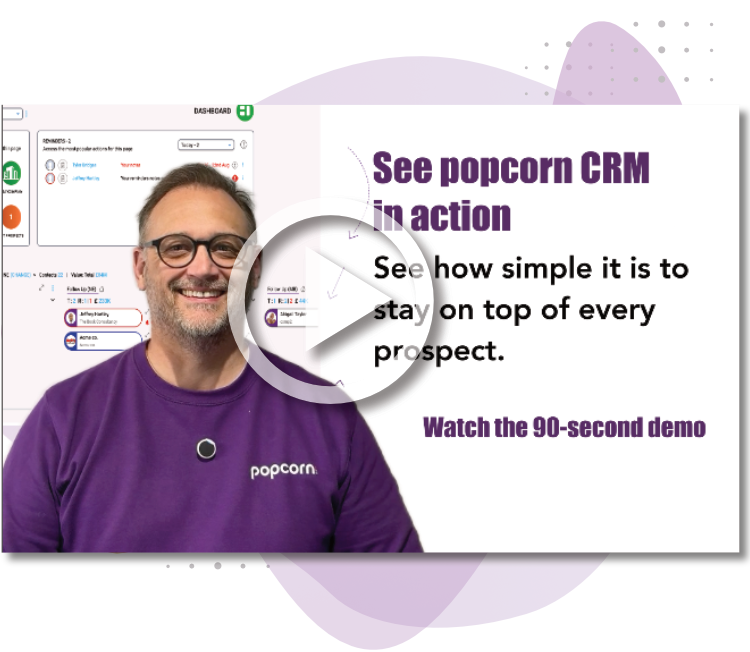
See popcorn in 90 seconds
The Small Business Alternative to HubSpot
See how popcorn keeps your customer journey joined up, without the complexity or the HubSpot price tag.
No contracts · No setup costs · UK-based support