
Mailchimp Sales Pipeline: Can It Manage Your Opportunities?
You've sent your marketing emails, spoken to a few prospects and had some promising enquiries. But do you know who needs following up, what you've discussed and where every opportunity stands?

Quick answer
Can you manage a Mailchimp sales pipeline? Mailchimp lets you organise contacts, add notes and automate email marketing, but it doesn't offer a dedicated visual pipeline for managing individual sales opportunities.
If you're juggling enquiries, meetings and follow-ups, a customisable sales pipeline gives you a clear view of where every prospect stands and helps you remember what needs to happen next.
With popcorn CRM, you can build your pipeline around how your business actually sells, while keeping notes, reminders, email engagement and identifiable website visits connected. That means less time searching for information and more time following up with the right people.
01 · Understanding Mailchimp
Does Mailchimp have a sales pipeline?
Mailchimp is primarily designed to help businesses manage their marketing. You can organise contacts, send campaigns, create automated marketing journeys and see how people engage with your emails.
But managing your marketing audience is different from managing the opportunities that come from it.
Imagine somebody enquires about your services. You have an initial conversation, arrange a meeting and agree to speak again next week.
You need somewhere to record what's happened, see where they are in your sales process and remind yourself when to follow up.
Mailchimp provides useful contact management features, including notes, tags and contact activity. However, it doesn't offer a dedicated visual sales pipeline built around moving individual opportunities through your own stages.
You could use tags and notes to create a basic workaround, but as your enquiries grow, keeping track of everything becomes more difficult.
A good sales pipeline helps you see every opportunity, understand what needs to happen next and make sure promising prospects don't get forgotten.
For a broader explanation of Mailchimp's CRM capabilities, read our guide: Is Mailchimp a CRM?
02 · Your sales process
What should a small business sales pipeline actually do?
A good sales pipeline gives you a simple, visual picture of how somebody becomes your customer.
And importantly, it should be customisable to the way your business works.
Every business sells differently.
A consultant might move from an initial enquiry to a discovery call, proposal and decision.
A tradesperson might arrange a site visit before providing a quotation.
A software business might offer a demonstration or free trial before somebody signs up.
You shouldn't have to change the way you sell to fit your CRM. Your CRM should fit your business.
For example, a consultancy might use:
While a tradesperson might use:
Both are valid sales pipelines because they reflect how those businesses actually work.
With a customisable CRM, you can create your own stages, name them in a way that makes sense and change them as your business develops.
If you have different types of opportunities, you may also benefit from separate pipelines. For example, you might want one for new customers and another for existing customers enquiring about additional services.
Each opportunity should give you a clear view of:
- Where the prospect currently sits in your sales process.
- What you've discussed and any relevant notes.
- What needs to happen next.
- When you need to follow up.
- Who is responsible for the next action.
- Any associated quotation or potential value, where relevant.
The real benefit isn't just seeing a pipeline. It's understanding the bigger picture without searching through emails, spreadsheets and scattered notes.
03 · Common challenges
Where using Mailchimp as a sales pipeline becomes difficult
Mailchimp is useful for generating interest and nurturing contacts through email marketing.
However, when somebody becomes a genuine sales opportunity, you often need more than campaign information.
Seeing opportunities at a glance
You want to know which prospects are new, which you've spoken to, which are waiting for a meeting and which need following up.
Mailchimp's tags and segments can help organise contacts, but they're not a substitute for a dedicated visual workflow that shows how individual opportunities are progressing.
Keeping track of your next action
You might promise to call somebody next Thursday, send information after a meeting or reconnect with a prospect next month.
Mailchimp can automate marketing communications, but those automated journeys are different from managing personal sales commitments.
A CRM with tasks and reminders helps you plan those actions rather than relying on memory.
Understanding the whole relationship
Mailchimp can store notes and show contact activity, so it isn't simply an empty marketing database.
The difference is how that information is used.
In a dedicated sales CRM, you can connect your contact history with their current opportunities, pipeline stages and upcoming actions.
That helps you understand not just whether somebody engaged with a campaign, but what that engagement might mean in the context of your relationship.
Spotting opportunities that have gone quiet
Not every prospect moves forward immediately.
Some need more time. Others stop responding. Some simply need another conversation.
A visual pipeline can help you identify opportunities that haven't progressed, while reminders and pipeline-health information help you decide where to focus your attention.
Mailchimp helps you communicate with your audience. A sales pipeline helps you organise the individual opportunities and follow-ups that come from those relationships.
04 · A practical example
Ten enquiries: Who do you follow up with next?
Imagine you've had ten enquiries over the last couple of weeks.
Three people want a meeting, two are waiting for information, three have spoken to you but haven't made a decision, and two have gone quiet.
It's Monday morning. You've got customer work to deal with, emails arriving and a busy week ahead.
Who should you contact first?
Without a structured system, you might search your inbox, check a spreadsheet or simply contact whoever you remember speaking to most recently.
Now imagine opening popcorn and seeing your opportunities organised in a pipeline.
One prospect has a follow-up reminder due today.
You open their contact record, review your notes from the last conversation and know exactly what you agreed to discuss.
Another is waiting for information you promised to send.
You can see the outstanding task and get it done before the prospect has to chase you.
A third hasn't responded for a fortnight.
But they've recently clicked one of your marketing emails and returned to your website, where those visits can be identified and linked to their contact record.
That doesn't prove they're ready to buy. However, it gives you useful context for reviewing their previous conversations and deciding whether a personal follow-up would help.
Meanwhile, your remaining opportunities are sitting in stages that reflect your own sales process. You can see which are progressing, which are waiting and which need attention.
Instead of spending the morning working out where everything stands, you can focus on taking the next actions.
That's the real value of a sales pipeline: helping you spend less time organising information and more time moving opportunities forward.
05 · Is it right for you?
Do you actually need a sales pipeline?
Not every business needs a complicated CRM.
If customers generally buy immediately, without conversations or follow-ups, your current marketing platform may be enough.
But if you're managing several prospects at different stages, a simple pipeline can quickly become valuable.
Ask yourself:
- Are you managing several enquiries at different stages?
- Do prospects often need more than one conversation before becoming customers?
- Have you ever forgotten to follow up when you promised?
- Are your notes and next actions spread across emails, spreadsheets or notebooks?
- Do opportunities sometimes go quiet because you're busy with other work?
- Would knowing who's engaging with your marketing help you prioritise your time?
If you've answered yes to several of these, a sales pipeline could make a real difference.
And it doesn't need to be complicated. For many small businesses, a handful of customisable stages, clear notes and reliable follow-up reminders are enough to start building better sales habits.
06 · How popcorn helps
How popcorn CRM keeps your opportunities moving
popcorn is designed for small businesses that want a straightforward way to organise prospects, manage relationships and stay on top of opportunities.
Customisable pipelines that fit your business
With popcorn, you can build your visual sales pipeline around the way you actually sell.
Create your own stages, choose names that make sense to your team and move opportunities forward as conversations progress.
You can also use different pipelines for different sales processes, keeping each type of opportunity organised in a way that works for your business.
Whether you arrange consultations, demonstrations, site visits, proposals or quotations, you're not forced into a rigid process.
You can explore how this works on our visual sales pipelines feature page .
Notes and contact history together
Before speaking to a prospect, it's useful to know what happened last time.
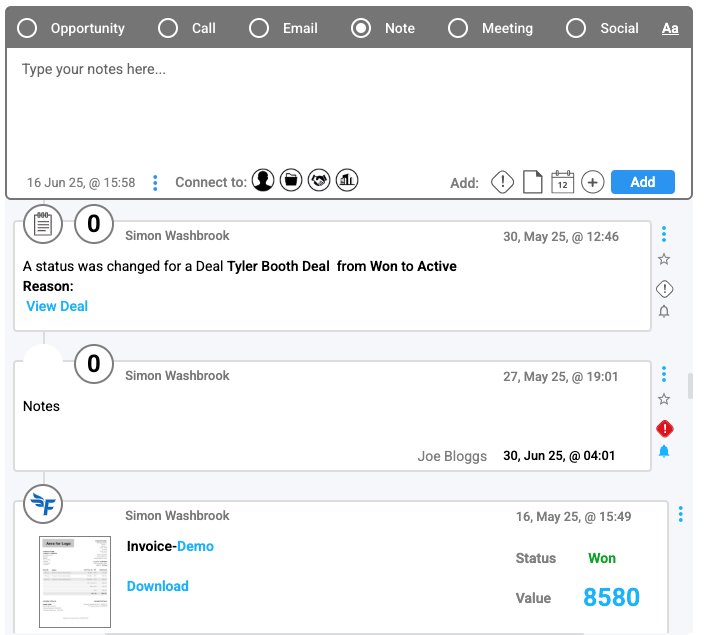
popcorn keeps your contact notes, conversations and relevant activity together, so you can quickly refresh your memory and pick up where you left off.
That might mean remembering a particular concern, checking what information you've already sent or reviewing what the prospect said about their timescale.
Follow-up reminders that keep you organised
Knowing what needs doing is only half the challenge. Remembering to do it when you're running a busy business is another.
With popcorn, you can create tasks and reminders for your next actions.
Whether you're following up after a meeting, checking in with somebody who needs more time or reconnecting with an old enquiry, you can plan your next contact rather than leaving it to chance.
A clear picture of what's happening
Your pipeline gives you a visual overview of your opportunities and helps you identify where progress has slowed.
Where relevant, you can also record deal values and manage quotations, but those aren't requirements for getting value from the system.
Sometimes the most useful thing your CRM can do is help you remember the right conversation, with the right person, at the right time.
07 · The bigger picture
Connect your Mailchimp sales pipeline thinking with email marketing and website tracking
This is where having your sales CRM and email marketing in one system becomes particularly useful.
A pipeline tells you where an opportunity stands. Your notes explain what you've discussed. Your reminders help you stay on top of the next action.
Marketing engagement adds another layer of understanding.
With popcorn's paid, integrated CRM and email marketing , you can send campaigns and review contact engagement alongside your sales activity.
You can also see relevant website visits where popcorn can identify and associate the visitor with a contact.
Imagine somebody who enquired about your services a month ago but wasn't quite ready to move forward.
You've kept them on your marketing list, and they've recently clicked an email about something you previously discussed.
They then return to your website to look at that service again.
Because the marketing activity and contact history are connected, you can review what you've discussed and decide whether now might be an appropriate time to follow up.
If they're still not ready, you can set a reminder to revisit the opportunity later.
Finding the prospects showing interest
popcorn's Hot Prospects feature helps highlight contacts who are engaging with your marketing.
Rather than treating every email click as a potential sale, you can consider those signals alongside your existing relationship with each person.
That helps you decide where your attention might be most useful.
You can find out more about Hot Prospects and lead scoring and website visitor tracking .
The benefit isn't simply having more information. It's having the information you need to decide what to do next.
08 · Compare the options
Mailchimp sales pipeline vs popcorn CRM: What's the difference?
Both platforms help small businesses organise contacts and communicate with their audience, but they're designed around different priorities.
| What your business needs | Mailchimp | popcorn CRM (paid plan) |
|---|---|---|
| Store and organise contacts | Yes | Yes |
| Send email marketing campaigns | Yes | Yes |
| Segment contacts | Yes | Yes |
| Record contact notes | Yes | Yes |
| Customisable visual sales pipelines | Not a dedicated feature | Yes |
| Manage individual sales opportunities | Limited through contact information | Yes |
| Set personal follow-up reminders | Not a dedicated sales workflow | Yes |
| View email engagement | Yes | Yes |
| Track identifiable website activity | Available in supported setups | Yes, for identifiable contacts |
| Connect marketing activity with opportunities | Depends on integrations and setup | Built into the CRM workflow |
| Manage deals and quotations | Not a core sales feature | Yes |
Mailchimp may be all you need if your main priority is sending campaigns and managing an audience.
But if your sales involve individual conversations, meetings and follow-ups, a dedicated sales pipeline offers a more structured way to manage those opportunities.
And if you're looking for a single system that combines those sales activities with email marketing, popcorn provides an integrated alternative.
For more on the wider differences, read our guide: Is Mailchimp a CRM?
Mailchimp also publishes its own contact management and CRM information , which is useful when comparing what each platform offers.
09 · Common questions
Mailchimp sales pipeline: Frequently asked questions
Does Mailchimp have a visual sales pipeline?
Mailchimp offers contact management, notes, tags and marketing automation, but a dedicated customisable visual pipeline for managing individual sales opportunities isn't one of its core features.
Can I customise my sales pipeline in popcorn CRM?
Yes. popcorn allows you to create pipeline stages that match your business's sales process. You can use different pipelines for different types of opportunities, helping you keep each process organised.
Can a CRM remind me to follow up with prospects?
Yes. Sales CRMs such as popcorn provide tasks and reminders, helping you remember when to call, email or reconnect with individual prospects.
What's the difference between marketing automation and a sales pipeline?
Marketing automation manages communications based on triggers and rules, such as sending emails after somebody signs up or engages with a campaign.
A sales pipeline helps you manage individual opportunities through your sales process, including conversations, meetings, follow-ups and decisions.
Can I connect my email marketing with my sales pipeline?
Yes. Some CRMs include built-in email marketing, while others connect to external marketing platforms. With an integrated system such as popcorn, you can review marketing engagement alongside contact history, opportunities and follow-up activity.
Do I need to track quotations or deal values to use a sales pipeline?
No. A sales pipeline can be useful whenever you need to manage prospects through several steps before they become customers.
You might be arranging appointments, booking consultations, managing trials or following up with enquiries. Deal values and quotations can be helpful, but they're not essential to every sales process.
10 · Final thoughts
Your pipeline should help you see the bigger picture
A sales pipeline shouldn't simply be somewhere you move contacts between stages.
It should help you understand your opportunities, remember conversations, stay on top of follow-ups and see what needs your attention.
And importantly, it should work around your business, not force you to change how you sell.
Mailchimp is a useful platform for organising audiences and running email marketing campaigns. But when your business depends on individual conversations and ongoing follow-ups, a dedicated sales CRM offers a clearer way to manage those relationships.
With popcorn, you can customise your pipeline, keep notes and reminders together and connect your sales activity with email marketing and identifiable website engagement.
That means less time searching for information and more time building relationships with your prospects.
Because winning more business isn't always about generating more leads. Sometimes it's about making sure you don't miss the opportunities you've already got.
See the bigger picture
Keep every opportunity moving with popcorn CRM
Discover how popcorn helps you manage opportunities, remember follow-ups and understand who's showing interest.
Friendly UK-based team. Straightforward advice, no pressure.